
Guests can always switch on 4G — and that is perfectly fine.
You have probably seen the scene more than once: someone opens a laptop, orders a drink, and stays on mobile data. In Vietnam, prepaid 4G packs are cheap and familiar, so guests simply pick whatever feels easiest in the moment. That is not your cafe “losing” at WiFi; it is just how people already use their phones.
Cafe WiFi is not meant to undercut carrier packs at roughly 5–10k VND. Your value sits elsewhere: a seat, power outlets, air conditioning, a workable space — plus a clear session policy. When guests know how long free access lasts, what happens when it ends, and how to buy more time if they still need to work, the experience feels far kinder than a sudden cut or another verbal reminder from staff.
This article helps you decide one concrete thing: when to sell hourly WiFi extensions, when session limits alone are enough, and when you should not sell yet.
Who should read this / who can skip it
Keep reading if you run a work-friendly cafe, you already limit free WiFi (or are about to), and you are unsure whether to open paid extensions. Or if peak hours leave staff walking table to table asking people to wrap up — and you want a clearer signal without making guests feel chased away.
Skip for now if you are mostly takeaway with few laptops. Or if your plan is to “sell WiFi cheaper than 4G so everyone uses the venue network” — that is the wrong comparison frame, so fix the value prop first. Also skip if the team is not ready for a soft gate and payment support; come back when that foundation is in place.
Keep two roles separate. You use IWAS SaaS (portal, packages, MikroTik sessions). End customers buy hourly packages you set at the venue — not the IWAS subscription price.
Three operating choices — not only “sell or don’t sell”
Do not jump straight to “10k or 15k.” Pick a model first. Most cafes are not stuck between “unlimited free forever” and “sell WiFi from minute one.”
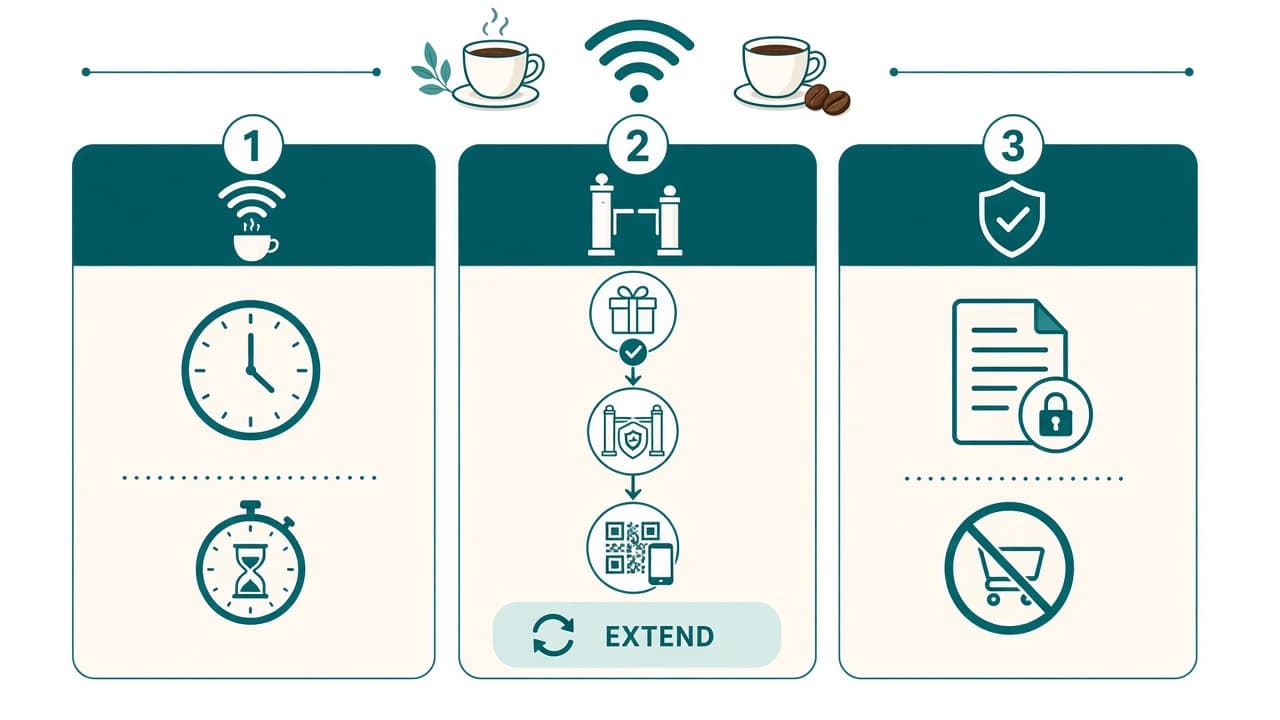
1. Limited free → then stop (pure dwell control)
Offer a free session — for example 60–120 minutes — then it ends, with no paid extension. This fits when you need fair table turns at peak hours, or you are not ready to handle WiFi payments yet.
2. Free → soft gate → buy more with VietQR
Start with free access. Near the end, the portal gives a gentle heads-up instead of an abrupt cut. Guests who still have work pick a package, scan VietQR, and extend the correct session. This fits work-friendly cafes where people actively need more time. It is the Package–payment–session model: How to Sell Hourly WiFi with a QR Code.
3. No WiFi sales — only SSID / policy by time of day
Shorter sessions at peak, looser off-peak, and no paid packages. That is enough when you only need dwell control.
Choose the model before you talk price. Price only makes sense after the operating choice is right.
When you SHOULD sell more time
Open extend packages when most of these signals line up.
Guests still have work to do on venue WiFi — a Zoom call, an upload, a deadline — and free time ran out before the task did. “Buy 60 more minutes” solves a real problem; it is not a trick to pry them off 4G.
Peak hours also need a clear signal instead of verbal reminders. Soft gate and packages on the portal speak for you: how long is left, and what to do if they want to stay. Staff can keep serving F&B, with fewer loops of “can you extend WiFi / change the password.”
Free should be long enough that it does not feel like a surprise fee. Commonly try 60–120 minutes — see Free WiFi for Cafes: How Long Should It Last? and One Drink, All Day.
The Package should also match what guests need. On venue WiFi they are not burning 4G data, and they may open heavier apps if your package allows it. Do not promise absolute “unlimited” — quota and speed are Package-dependent on the dashboard.
Bottom line: sell more time when the value is continuing at the table, not “beating” 4G on price per GB.
Want to try this on your own cafe WiFi? Try IWAS free for 14 days, then the Starter plan is 249,000 VND per month per location. IWAS works with MikroTik (RouterOS v7 or newer), OpenWrt and UniFi. Start your free trial
When you should NOT sell (or not yet)
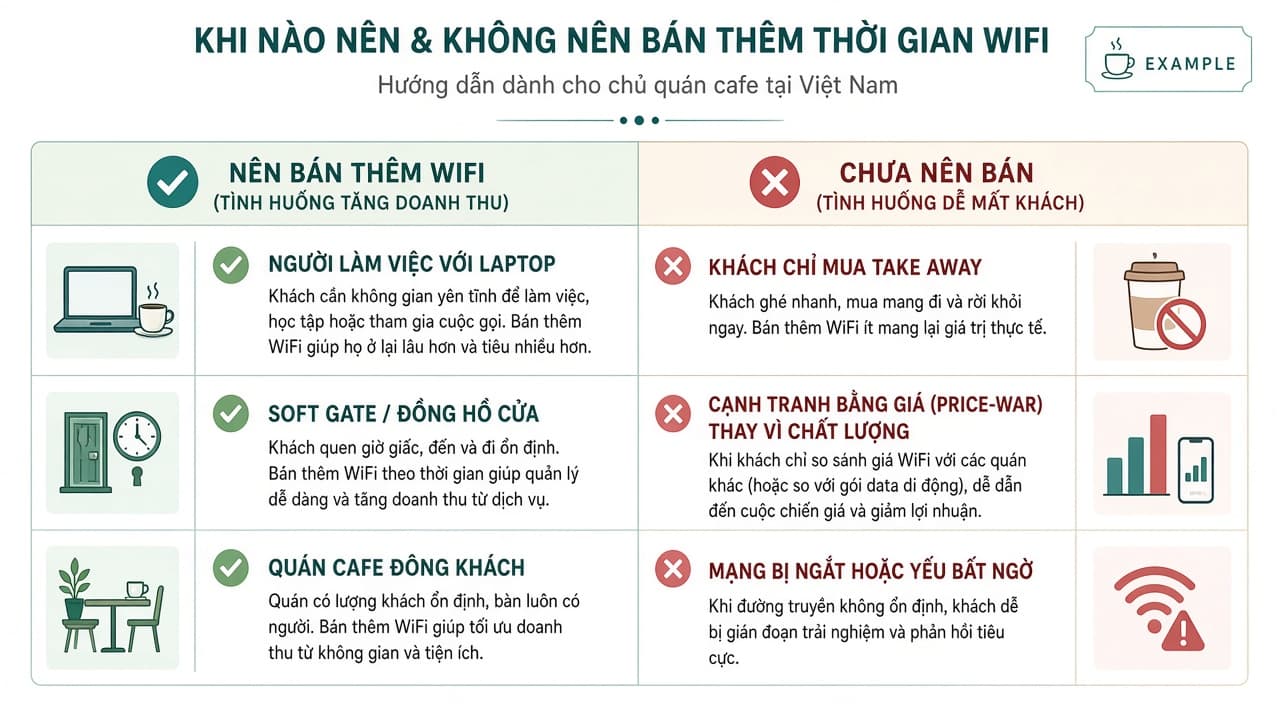
If you are mostly takeaway with few laptops, hourly packages rarely sell. A light session limit (choice 1 or 3) is usually enough.
If the team is not ready for soft gate and payments, be careful: VietQR must confirm the correct session. When staff still freeze if a guest asks “what happens when time runs out?”, turn on session limits only first.
If you want to be “cheaper than 4G,” stop. Carrier packs at ~5–10k VND are already familiar. Cafe WiFi sells on-site experience and policy — not “data cheaper than the carrier.”
If free is too short, or it cuts with no warning, guests read that as a surprise charge. Fix free length and soft gate first, then open VietQR.
Not selling by the hour is not a failure. Many venues only need dwell control. IWAS supports free Packages that simply end — no paid package required.
Example package price frames (not a carrier rate card)
These are operating examples for cafe owners — not fixed IWAS prices, and not “prices meant to compete with 4G.”
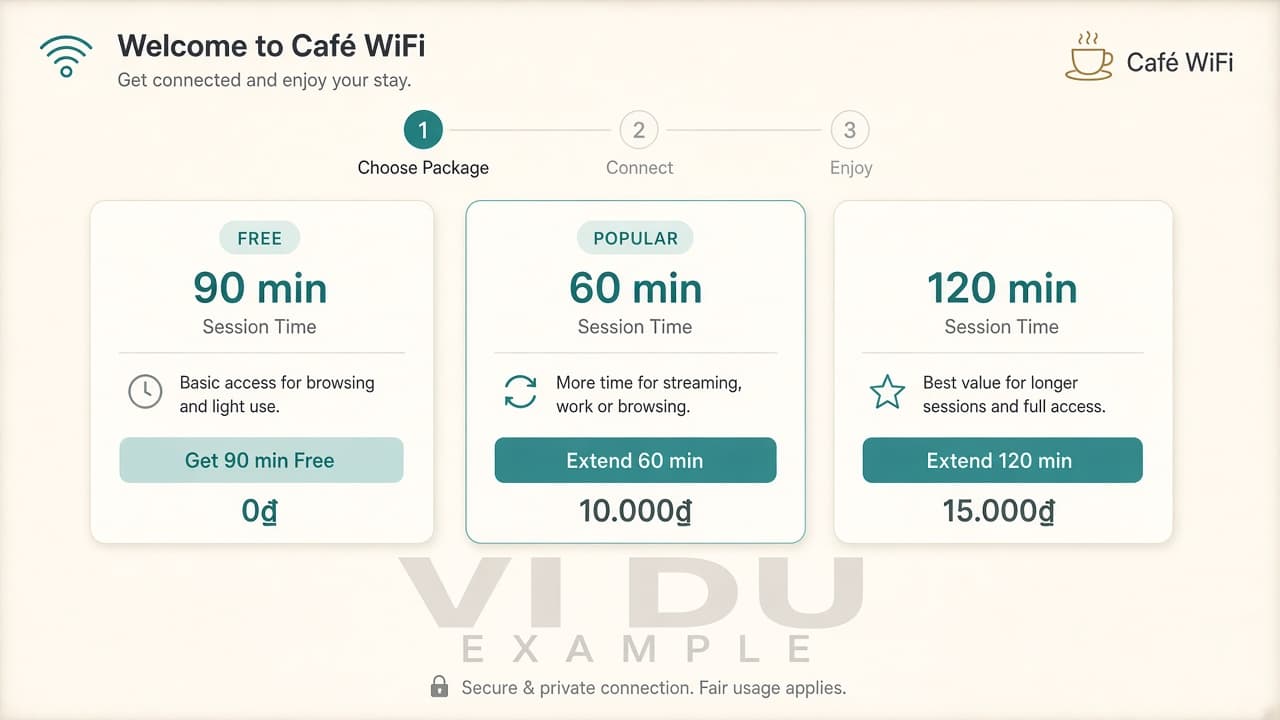
| Package (example) | Duration | Guest price (example) | Note |
|---|---|---|---|
| Free | 90 minutes | 0 VND | Soft gate before it ends |
| Short extend | 60 minutes | 10,000 VND | Just need one more stretch |
| Long extend | 120 minutes | 15,000 VND | Longer meetings / deep work |
Compare against seat value (table + power + AC + WiFi under your policy), not against 4G ARPU.
Keep two fees distinct. Guest packages on the portal are set by the venue — the table above is only an example. IWAS SaaS: 14-day trial, then 249,000 VND/month/location — software for the owner, not the price charged to end customers. You can keep Free 90 minutes without opening Extend, as long as the value prop is not “cheaper than Viettel.”
Short technical flow (not a full tutorial)
This is more than sticking a static QR on the table.
Guest connects to WiFi → gets a free Package → soft gate near the end → chooses an extend → scans VietQR (PayOS) → confirms → the correct MikroTik session is extended.
You set policy on the dashboard; the router enforces it. Remote ZTP, no static public IP required. Dig deeper: Install Captive Portal + PayOS in 15 Minutes, How to Limit WiFi Time on MikroTik for Cafes with IWAS, How to Sell Hourly WiFi with a QR Code.
Selling WiFi here means policy plus portal UX — not turning the cafe into a mini ISP.
If your staff still write WiFi passwords on paper, see how hotspot billing on MikroTik lets you stop handwriting passwords.
Measure 7 days after you turn it on (KPIs — no invented baselines)
Once it is live, watch one week with your real numbers. Leave blanks where you have no data yet — do not paste sample convert percentages.
| Metric | How to capture | Pilot |
|---|---|---|
| Free sessions completed | Dashboard / logs | Week 1: ______ |
| Soft-gate hits | If the portal counts them | Week 1: ______ |
| Successful extends | PayOS / package orders | Week 1: ______ |
| Most-chosen package | 60 vs 120 min (example) | Week 1: ______ |
| Staff / guest feedback | Table reminders, password asks, switch to 4G | Qualitative |
Some guests will switch to 4G when free ends — that is normal. The portal serves people who want to continue on venue WiFi. If week 1 does not fit, adjust free length, soft gate, or pause paid extensions.
IWAS is guest WiFi management software for cafes: guests get online through a login page (captive portal), the cafe sets its own plans by time, speed and data, and guests can buy more time with VietQR through the cafe's own PayOS account. IWAS works with MikroTik (RouterOS v7 or newer), OpenWrt and UniFi routers. Learn more about IWAS.
Frequently asked questions
Will selling WiFi push everyone onto 4G?
Some will use 4G — and that is fine. You do not need 100% of guests on venue WiFi. The portal helps people who still have work at the table; guests on 4G can still sit and order drinks as usual.
What price is “more expensive than 4G”?
That question compares the wrong thing. Ask whether the guest needs more time at the table. The value is the seat and the experience, not price per GB.
Do I have to sell WiFi to use IWAS?
No. You can run free Packages that simply end. Open VietQR when the soft gate feels solid and the team can support payments.
How long should free last before selling more?
Usually 60–120 minutes, depending on your model. See Free WiFi for Cafes: How Long Should It Last? and One Drink, All Day.
How does payment work?
Near or at session end → guest picks a package → scans VietQR via PayOS on the portal → confirms → session extends. See Install Captive Portal + PayOS in 15 Minutes and How to Sell Hourly WiFi with a QR Code.
How does IWAS pricing work?
14-day trial; then 249,000 VND/month/location. That is SaaS for the owner — separate from the Free/Extend prices you sell to end customers.
Should a small cafe start this week?
You can turn on session limits only first. When the soft gate feels familiar, open hourly extensions. You do not need to do everything in one sitting.
Wrap-up · Start when guests need to continue
Cafe WiFi does not beat 4G on data price — and it does not need to win that race.
You win when guests know how long free lasts, what happens when the session ends, and how to buy more time on the portal if they still have work at the table. Some will still choose 4G. Work-friendly guests will remember that nothing cut them off mid-task and nobody had to nag them table by table.
Pick one of the three choices. Keep free long enough. Use VietQR only when the value prop is continuing to sit — not undercutting carriers. Measure 7 days with your real numbers, not sample percentages.
Try IWAS for 14 days — after the trial 249k VND/month/location (SaaS fee, not guest package prices). Cafe page: getiwas.com/wifi-cafe. Start at getiwas.com.
Read next: