The short answer: before you pick cafe WiFi management software, ask eight questions: does it work with the router you already have, does it need a static IP, where does the money guests pay go, where do you reconcile, how do plans and vouchers work, how is the software fee charged (separately from the WiFi plan price guests pay), can you trial it on your real router, and who helps when something breaks. At the end there's a table with IWAS's answer to each one.
A few months after opening, WiFi starts to become a thing: guests keep asking for the password, some tables stay from morning to evening, and every password change sends regulars back to the counter. You search for WiFi software for your cafe and every site says it's easy, cheap and packed with features.
Comparing feature lists gets confusing fast. It's easier to take the eight questions below, put them to each provider, and listen to how clearly they answer. Wherever the answer gets vague, that's where to dig deeper.
When does a cafe need WiFi management software?
For a small cafe where guests pop in and out, one shared password at the counter is fine. You start needing software when you want each guest on their own session, time or speed limits, or guests buying more time themselves instead of staff reminding them. All of that runs through the login page guests see when they join, the captive portal (see how a MikroTik captive portal works). To review your whole cafe WiFi setup from installation onwards, see the WiFi for cafes checklist.
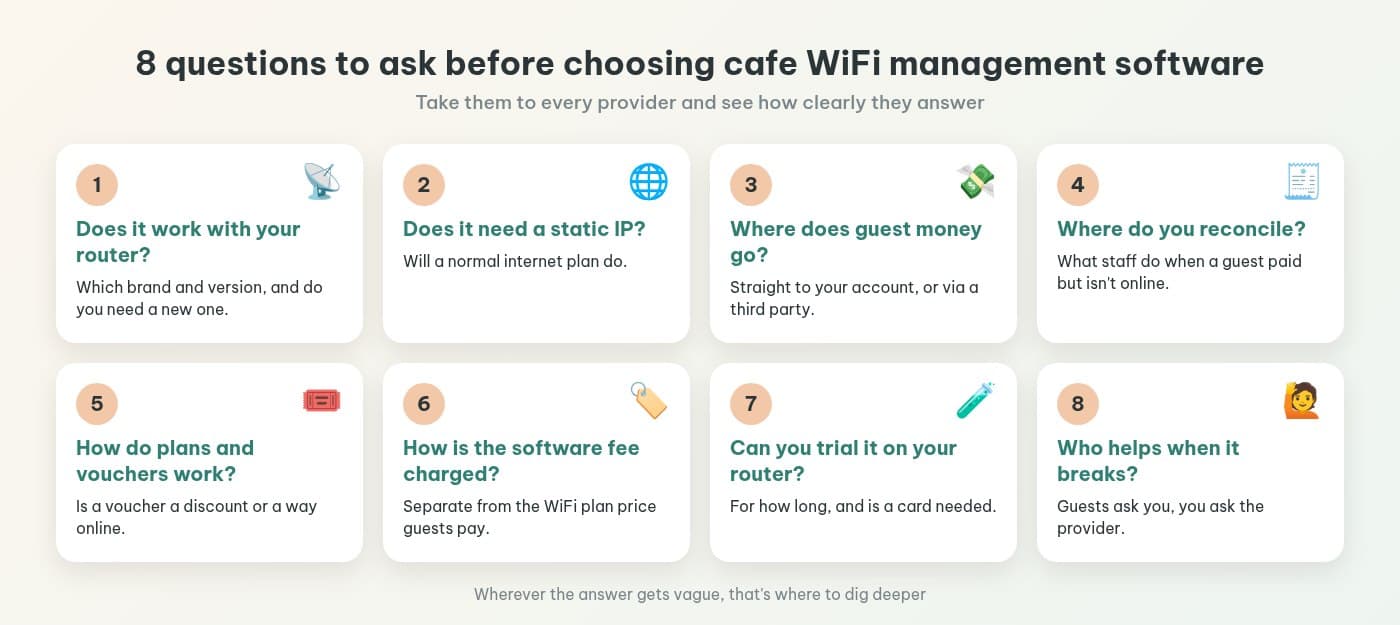
8 questions to ask before you choose
1. Does it work with the router you already have?
Ask about the router brand and the software version it runs. Some products only work with one brand, so if you'd need a new router, add that to the cost. For MikroTik, ask which RouterOS version is required; if you don't know what yours runs, see how to check and upgrade to RouterOS v7. About to buy a new router? Ask the software provider first, then buy.
2. Does it need a static IP?
Most cafe internet plans are ordinary plans without a static IP. If the software needs one, you'll have extra work with your provider. Ask early, especially if you're about to get a line installed or change plans (choosing an internet plan for your cafe lists what to ask the provider).
3. Where does the money guests pay go?
This is the big one if you plan to sell extra WiFi time. Does the money go straight to your account, or through the provider's account first? If it goes through a third party, how long until it reaches you, and who holds it in the meantime? The answer should be clear and short.
4. Where do you reconcile, and what happens when a guest says “I paid but I'm not online”?
Ask which screen you use to check transactions at the end of the day, and whether it's enough to compare with your bank statement. Ask about the most common situation too: a guest says they've paid but can't get online. What do staff do, and can they approve it by hand or confirm it manually? How IWAS handles this is in collecting cafe WiFi payments with VietQR.
5. Can you set your own WiFi plans and vouchers?
You should be able to set plans by time, speed or data, and set your own prices. For vouchers, ask what a voucher actually is in that product: a discount when buying a plan, or a code that gets guests online. Products differ, and knowing first means the tickets you print won't confuse anyone. Four everyday ways cafes use vouchers are in cafe WiFi voucher codes.
A small tip: for any feature you really need (say, plans that change automatically at peak hours), ask the provider to show it to you in the dashboard, not just describe it.
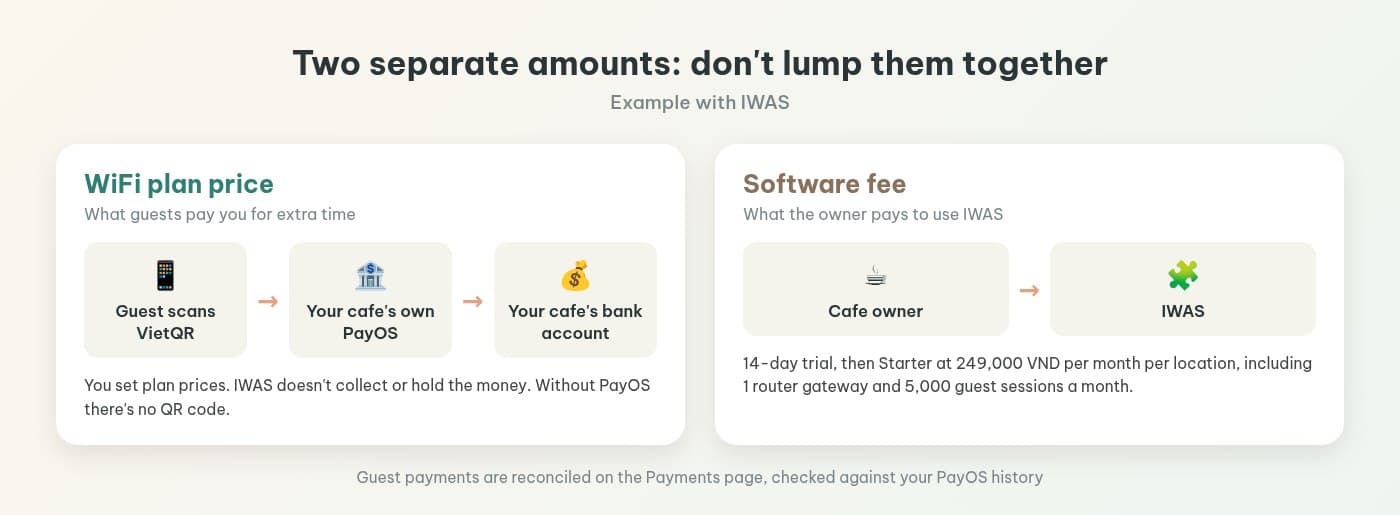
6. How is the software fee charged, and is it separate from the WiFi plan price?
There are two different amounts. The software fee is what you pay to use the system. The WiFi plan price is what guests pay you for extra time. Ask what the fee is based on (per location, per router or per session), how many guest sessions you get each month, and who charges the payment gateway fee, if there is one. Not sure what to charge for WiFi plans? See cafe WiFi vs 4G: should you sell WiFi by the hour.
7. Can you trial it on your real router?
A slick demo doesn't tell you much. Ask whether you can trial it on your own router, for how long, and whether you need to enter a card. During the trial, play the guest: connect with one iPhone and one Android phone, buy a small plan, then check the transaction shows up where you reconcile. The step-by-step MikroTik setup is in installing a captive portal with PayOS in 15 minutes.
8. Who helps when something breaks?
There are two levels. When your guests get stuck, they ask you, so the login page needs a spot for your hotline or Zalo link (see your cafe WiFi login page: what to show guests). When you get stuck, you ask the software provider: through which channel, during which hours, and in which language.
How IWAS answers these 8 questions
IWAS is guest WiFi management software for cafes: guests get online through a login page (captive portal), the cafe sets its own plans by time, speed and data, and guests can buy more time with VietQR through the cafe's own PayOS account. IWAS works with MikroTik (RouterOS v7 or newer), OpenWrt and UniFi routers. Learn more about IWAS.
| Question | IWAS |
|---|---|
| 1. Router | Works with MikroTik, OpenWrt and UniFi. Only MikroTik needs RouterOS v7 or newer. |
| 2. Static IP | Not needed. The router connects to IWAS through a WireGuard tunnel, so a normal internet plan is fine. |
| 3. Where the money goes | Through your cafe's own PayOS account, straight to the bank account you linked. IWAS doesn't collect or hold the money. Without PayOS, the login page shows no QR code. |
| 4. Reconciling | On the Payments page: see transactions, approve pending or expired ones once the money has arrived, and use manual confirm when a guest pays at the counter. Check it against your PayOS history daily. |
| 5. Plans and vouchers | You create plans by time, speed and data. A voucher is a discount code for a plan (percentage or fixed amount, 100% makes it free), made one at a time or in bulk, printable on A4, A5, K80. The code that gets guests online is the activation code they receive after buying. No plans that switch automatically by time of day. |
| 6. Software fee | Starter is 249,000 VND per month per location, including 1 router gateway and 5,000 guest sessions a month. The price of the WiFi plans you sell to guests is set by you and is a separate thing. |
| 7. Trial | 14 days. Creating a workspace starts the trial, no credit card needed. |
| 8. Support | Your guests: the hotline, email and Zalo/Messenger link you fill in under Settings > Organization show right on the login page. You: Starter includes priority email support at hello@getiwas.com. |
The quickest way to check each answer on your own router is to try it. If you're still handwriting passwords or creating single users on the router, hotspot billing on MikroTik for cafes shows how to move to a login page with plans and VietQR.
Frequently asked questions
How much does IWAS cost?
There's a 14-day trial, then Starter is 249,000 VND per month per location, including 1 router gateway and 5,000 guest sessions a month. That's the software fee the owner pays. The price of WiFi plans for guests is set by the cafe, and that money goes through the cafe's PayOS.
Which routers does IWAS work with?
MikroTik, OpenWrt and UniFi. The RouterOS v7 or newer requirement only applies to MikroTik. Not sure which version your MikroTik runs? See the RouterOS v7 check and upgrade post on the IWAS blog.
Does cafe WiFi management software need a static IP?
Not with IWAS. The router connects to IWAS through a WireGuard tunnel, so a normal internet plan is fine. With any other software, ask this before you sign up.
Where does the money guests pay for WiFi go?
With IWAS, it goes through your cafe's own PayOS account to the bank account you linked. IWAS doesn't collect or hold the money. Without PayOS, the login page shows no QR code.
Is a voucher the code that gets guests online?
Not in IWAS. A voucher is a discount code guests use when buying a WiFi plan, a percentage or fixed amount off, and 100% off makes it free. The code that gets them online is the activation code they receive after a successful purchase and enter on the login page's activation code tab.
What's the difference between setting up a hotspot on the router yourself and using management software?
A HotSpot you set up on MikroTik yourself can still give you a login page, users and time limits, but you create users, edit the login page and handle payments and reconciling on your own. Management software puts plans, vouchers, VietQR payments and reconciling in one dashboard, so staff stop handwriting passwords.
Wrapping up
Choosing WiFi management software for your cafe doesn't take technical know-how. Take these eight questions, listen to the answers, then try it on your real router. When the answers are clear and the trial matches them, you can decide with a lot more confidence.
Want to check all eight on your own router? Try IWAS free for 14 days; it works with MikroTik, OpenWrt and UniFi. After the trial, Starter is 249,000 VND per month per location; see pricing.