Short answer: a small venue doesn't need to run its own RADIUS server. With one router, few guests and nothing to sell, users stored on the router are enough. If you want each guest on their own session, to sell extra time, or to run a few locations, RADIUS really helps, but you can use cloud RADIUS: the server lives in the cloud, your MikroTik or OpenWrt router connects to it through a WireGuard tunnel, no static IP, and nothing to babysit in the shop.
It usually starts like this. You want to give guests an hour of free WiFi and let anyone who wants to stay longer buy more time. You ask the network technician you know, and he nods: “Sure, but you'll need a RADIUS server.” Then comes the list: a server, a static IP, port forwarding, a database… By the end you just want to go back to taping the password to the counter.
This post walks through RADIUS in plain owner language: what it is, when you need it, what running your own involves, and why keeping RADIUS in the cloud usually suits a small venue better.
What RADIUS is, in owner terms
Think of RADIUS as the person checking tickets behind the counter. When a guest joins the WiFi and logs in, the router doesn't decide on its own. It turns and asks: “Can this guest get online? For how long? At what speed?” RADIUS answers, and the router follows.
While the guest is online, the router also reports back how much time and data they've used. That record is called accounting. It's how time-up actually means time-up, and how you can see at the end of the day who used how much.
Guests never see RADIUS. All they see is the login page that pops up when they join the WiFi, the captive portal. For the details on that part, see what a MikroTik captive portal is.
Without RADIUS, how does the router check guests?
The router can still do it on its own, with its own notebook. On MikroTik, HotSpot lets you store a list of users right on the router, with time and speed limits per group. MikroTik's own documentation describes the two options: a local user list on the router, or asking an external RADIUS server.
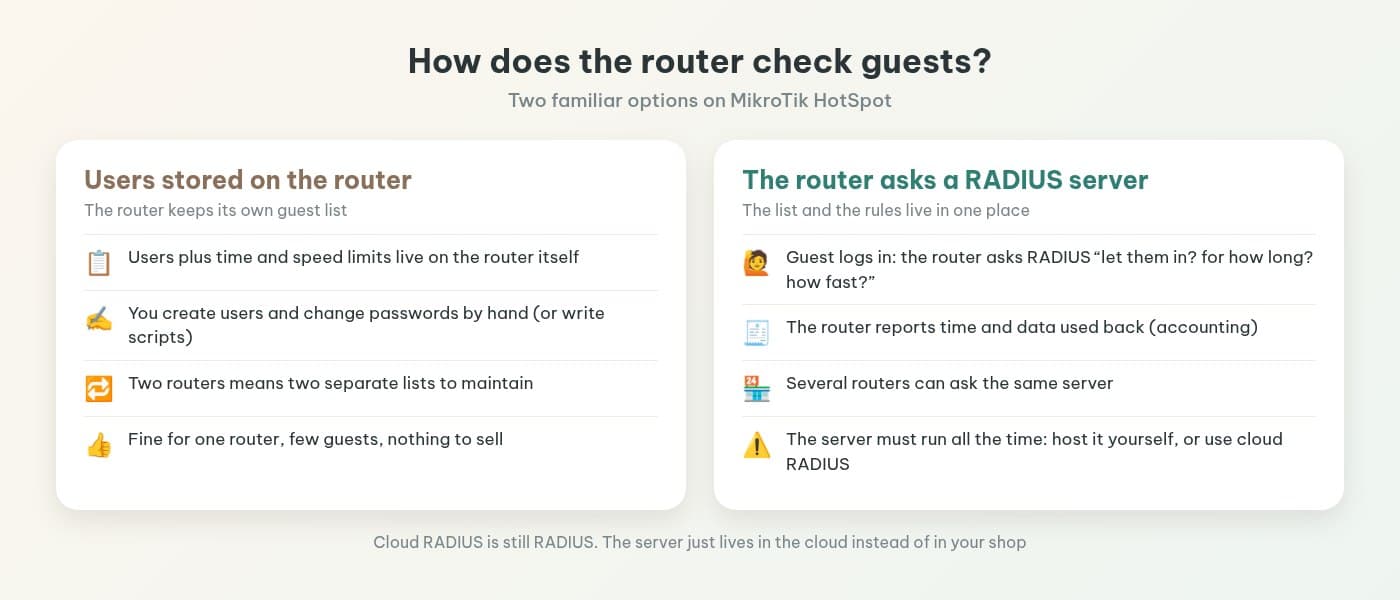
The notebook approach works with one router and few guests. The cracks show over time:
- Users made by hand. One user per guest, but who creates them? Usually staff, and at rush hour they just write passwords on paper. Hotspot billing on MikroTik for cafes covers that loop in detail.
- One notebook per router. Add a router upstairs or open a second location, and that's another list to keep in sync.
- No place for the money side. The router handles how long someone stays online. Selling extra time, where the money goes and how you reconcile at closing are left to you.
Running your own RADIUS server: what it takes
At this point many owners think: fine, set up RADIUS and be done. Technically that's right. RADIUS puts the guest list and rules in one place, and several routers can ask the same server. But “setting it up” hands you a whole list of jobs:
| What you take on | What it means for your venue |
|---|---|
| A machine running day and night | A PC in the shop or a rented server. If it's off, guests can't log in. |
| A path from router to server | If the server is elsewhere, the router has to reach it: a static IP, open ports or your own VPN. |
| Installing and maintaining RADIUS | FreeRADIUS (or similar), a database, backups, security updates. |
| Everything guests actually see | RADIUS only answers “let them in or not”. The login page, plans, payments and reconciling are extra work on top. |
| Someone to fix it | The server fails at 7 a.m. Who looks at it? Usually you, or your network technician if you can reach them. |
For a company with an IT person, that list is normal. For a cafe, it's one more thing to look after next to the espresso machine, the POS and the cameras. And RADIUS is only half the story. The part guests see (login page, plans, payment) still has to be built.
Cloud RADIUS: still RADIUS, just not in your shop
Cloud RADIUS keeps the same “router asks a server” model and only changes where the server sits: in the cloud, run by the provider. For a venue, the difference shows up in three places.
No server to look after. No PC running all day in the back room, no backups or RADIUS updates to handle yourself.
No static IP. MikroTik and OpenWrt routers connect out to the cloud, so your normal internet plan is enough. No calls to the ISP for a static IP or port forwarding.
Several locations share one place. Routers at every location ask the same server, and you manage them from one dashboard. In IWAS, WiFi plans belong to your venue account (workspace), not to one router or location, so you create them once and they work on every router in that account. Opening another location doesn't mean rebuilding your plans.
How IWAS connects your router to cloud RADIUS
IWAS runs FreeRADIUS in the cloud. MikroTik and OpenWrt routers connect to IWAS through a WireGuard tunnel that's set up automatically during install. The router dials out, so no static IP is needed. Through that same tunnel, IWAS can send a disconnect to the router when a guest's time is up, even when the router sits behind your ISP's NAT.
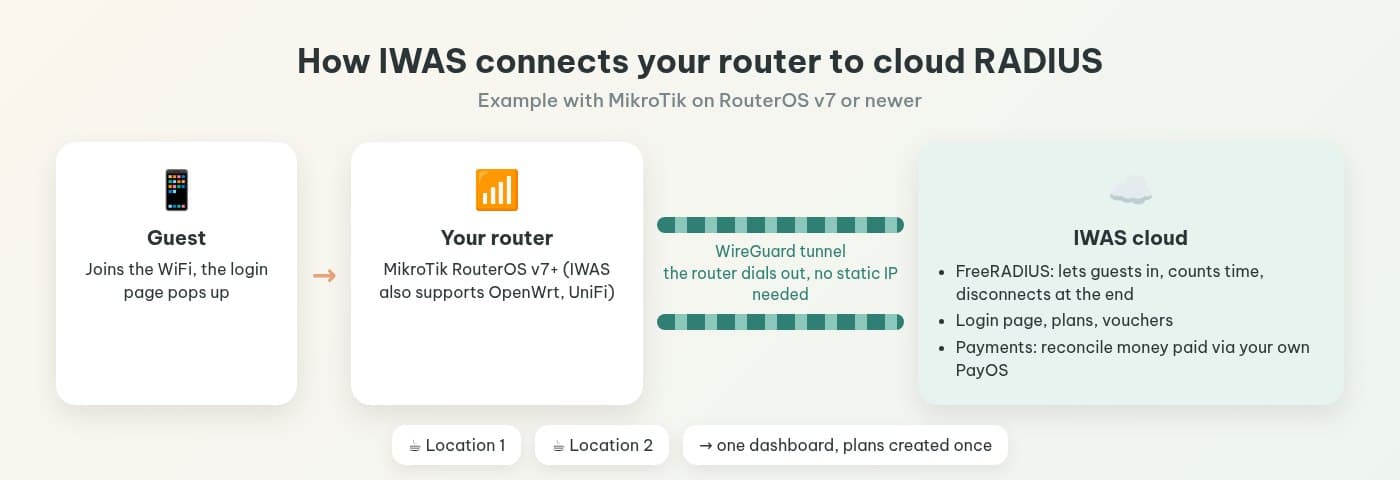
Taking MikroTik as the example, your part is short:
- Check the router runs RouterOS v7 or newer (IWAS needs it for MikroTik, and WireGuard is part of RouterOS v7). How to check and upgrade is in check and upgrade MikroTik to RouterOS v7.
- Create the router in the IWAS dashboard and copy the ZTP (Zero-Touch Provisioning) command it generates for that router.
- Paste the command into the MikroTik Terminal and wait for the router to show Online in the dashboard.
- Create your WiFi plans, then test it yourself as a guest.
You don't configure RADIUS or WireGuard line by line. The full steps are in install a captive portal with PayOS on MikroTik in 15 minutes. On OpenWrt, the install command also sets up the WireGuard tunnel and points RADIUS at IWAS, and the login page runs on CoovaChilli, nodogsplash or openNDS, depending on what's installed on the router. On UniFi, UniFi uses the IWAS external guest portal. The RouterOS v7 requirement only applies to MikroTik.
The part guests see is already in IWAS as well: the login page, plans by time, speed and data that you set, vouchers as discount codes on those plans, and buying extra time with VietQR through your own PayOS account (without PayOS configured, the login page shows no QR). Guest payments are reconciled on the Payments page.
IWAS is guest WiFi management software for cafes: guests get online through a login page (captive portal), the cafe sets its own plans by time, speed and data, and guests can buy more time with VietQR through the cafe's own PayOS account. IWAS works with MikroTik (RouterOS v7 or newer), OpenWrt and UniFi routers.
When users on the router are enough
To be fair, not every venue needs RADIUS. If you have one router, most guests take away, you don't plan to sell extra time and a shared password still works, keep it simple. Just put guests on a separate network from your POS and cameras. Changing your WiFi password every day, or switching to a captive portal? helps you see where your venue stands.
Start thinking about cloud RADIUS when you notice any of these: staff spend real time on WiFi passwords, guests stay long and you'd like to offer extra time, or a second router or second location is coming. If you're comparing providers, take along 8 questions to ask before choosing cafe WiFi management software. And to review your whole cafe WiFi, from the internet line to daily running, use the checklist for cafe WiFi from setup to daily operation.
Frequently asked questions
What is RADIUS?
RADIUS is a type of server the router asks every time a guest logs in to WiFi: can this guest get online, for how long, at what speed. While the guest is online, the router reports time and data used back to the server so it can keep a record (this is called accounting).
Does a small cafe need RADIUS?
With one router, few guests and no WiFi plans to sell, users stored on the router are enough. Once you want each guest on their own session, sell extra time, or run two or more routers, RADIUS keeps everything in one place. At that point you can use cloud RADIUS instead of running your own server.
What does running your own RADIUS server take?
A machine running day and night, a path from the router to the server (static IP, open ports or a VPN), installing and updating RADIUS software and a database, then building the login page, plans, payments and reconciling yourself. And someone to fix it when it breaks.
Does IWAS cloud RADIUS need a static IP?
No. MikroTik and OpenWrt routers connect out to IWAS through a WireGuard tunnel set up automatically during install, so a normal internet plan is fine. Through that tunnel IWAS can also disconnect a guest's session when their time is up, even with the router behind NAT.
Which routers does IWAS work with?
MikroTik, OpenWrt and UniFi. MikroTik and OpenWrt connect to IWAS over WireGuard, while UniFi uses the IWAS external guest portal. The RouterOS v7 or newer requirement only applies to MikroTik. Not sure which version your MikroTik runs? See the RouterOS v7 check and upgrade post on the IWAS blog.
What if I have several locations?
All locations sit in one IWAS dashboard, with permissions per person. WiFi plans belong to your venue account, not to a router or location, so you create them once for every router in the account. A code a guest bought works at locations under the same venue account, but each code allows only one device online at a time. Pricing is per router gateway: Starter includes 1 router, and for more routers see the larger plans on the pricing page.
How much does IWAS cost?
There's a 14-day trial, then Starter is 249,000 VND per month per location, including 1 router gateway and 5,000 guest sessions a month. That's the software fee the owner pays, separate from the price of the WiFi plans you sell to guests.
Wrapping up
RADIUS sounds big, but its job is simple: tell the router who gets online, for how long and how fast, and keep a record of what they used. A small venue wants that benefit without adopting a server. Keep RADIUS in the cloud, let the router connect to IWAS, and you get the useful part without the babysitting.
Want to try it on your own router? Head to getiwas.com to start a 14-day IWAS trial. It works with MikroTik (RouterOS v7 or newer), OpenWrt and UniFi. After the trial, Starter is 249,000 VND per month per location; see pricing.