The short answer: hotspot billing on MikroTik ties your WiFi login page to usage plans (free, paid or voucher), so each guest gets their own session with a clear time limit and can buy more time themselves, instead of staff handwriting passwords. It pays off when your tables fill up and guests work for hours; a quiet cafe that mostly sells takeaway doesn't need it yet.
IWAS is guest WiFi management software for cafes: guests get online through a login page (captive portal), the cafe sets its own plans by time, speed and data, and guests can buy more time with VietQR through the cafe's own PayOS account. IWAS works with MikroTik (RouterOS v7 or newer), OpenWrt and UniFi routers. Learn more about IWAS.
If you run a cafe, this scene is probably familiar: a guest sits down and asks "What's the WiFi password?", and staff either read it out loud or point at a sticky note on the counter. More careful shops create one code at a time on the router, scribble it on a slip, and hand it over with the drink. By closing time, nobody remembers which code went to whom, who sat from morning until afternoon, or whether yesterday's code is already circulating in a chat group next door.
If your cafe already runs a MikroTik router, there is a much less exhausting approach — people usually call it hotspot billing. This article explains what that means in cafe-owner language, compares it with what most shops do today, and helps you decide whether your venue actually needs it yet.
What is hotspot billing, in cafe-owner language?
MikroTik routers running RouterOS already include HotSpot: when a guest joins WiFi, they see a login page before they can reach the internet. If you want the technical side, What Is a MikroTik Captive Portal? covers how that works in more detail.
"Billing" is the part that ties that login page to a concrete package (how many minutes, what speed, how much data) and to how the guest receives it — free, paid, or with a voucher. In short, hotspot billing is not about turning your cafe into an ISP. It is an operations tool so each guest gets their own session, clear time limits, and anyone who still needs the table can buy more time without calling staff over.
Three ways cafes control WiFi on MikroTik
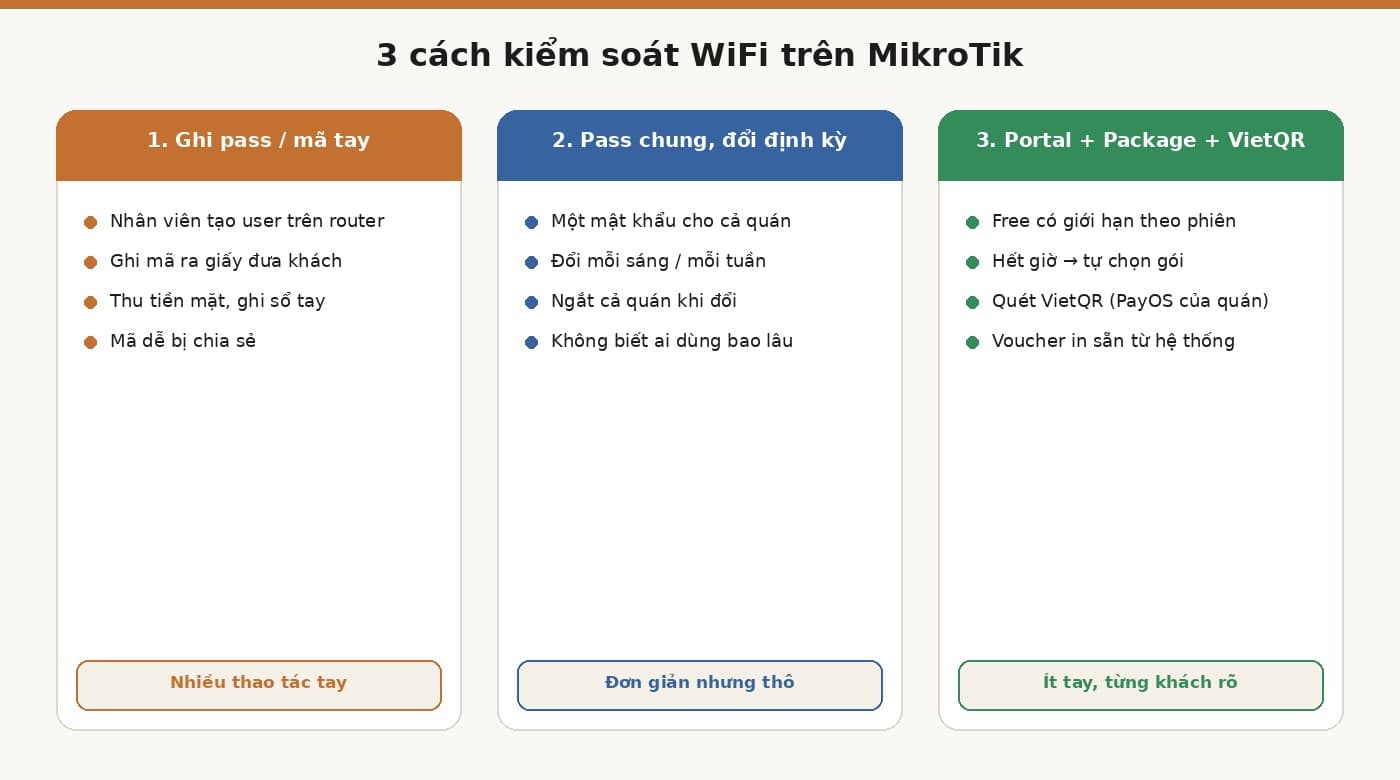
Handwrite passwords or codes, create users manually
This is how many cafes start: staff open HotSpot users or User Manager on the router, create each account, write it on paper, and hand it to the guest. The upside is that you do not need a payment gateway or extra software, and you can still put a time limit on each code.
Do it long enough and it gets tiring. At rush hour, staff are making drinks and creating codes at the same time; cash payments mean another line in a notebook; and once a code is out, guests happily photograph it and send it to friends. The busier the cafe, the more that manual work balloons.
One shared password, changed on a schedule
This is simpler: the whole venue uses one password, changed every morning or every week. It blocks old devices that saved the previous password, but every change drops everyone at once, regulars have to ask again, and the new password spreads within a few hours. More importantly, you never see how long each guest actually used. One Drink, All Day also talks about this password-rotation habit.
Portal, Package, and VietQR — plus vouchers printed from the system
The third way lets the system do the handwriting. Guests join WiFi, sign in through the portal, and get free access for a window you set. When time runs out, the portal shows packages they can pick themselves. If they want to stay, they scan VietQR with their bank app; money goes through the cafe's own PayOS account; once payment clears, the session continues. You can read more in How to Sell Hourly WiFi with a QR Code.
Alongside that, the cafe still has vouchers the system creates and prints ahead of time — for regulars or promotions. These vouchers are discount codes used when buying a plan, not codes that get a guest online. The difference is staff no longer type each code by hand.
Quick comparison
| Criterion | Handwrite pass/code | Shared password, rotate | Portal + Package + VietQR (IWAS) |
|---|---|---|---|
| Staff work | High — create and write every code | Change pass, reprint notes, answer guests | Low — mostly when a guest needs help |
| Per-guest control | Yes, per code | No | Yes, per session |
| How you collect money | Cash, notebook | Usually none | VietQR via the cafe's PayOS, voucher, or manual confirm |
| Review transactions | Notebook | None | Payments page on the IWAS dashboard |
| Needs static IP | No | No | No |
| Must self-host RADIUS | Depends how you build it | No | No |
This table compares operating styles — it is not saying one is always better. A small cafe with few long-stay guests may still be fine with a simple approach.
You do not have to drop vouchers — drop the handwriting
When people hear "automation," they often assume vouchers have to go. Vouchers are still useful. What wears cafes out is creating, writing, and managing codes by hand.
What vouchers can do on IWAS
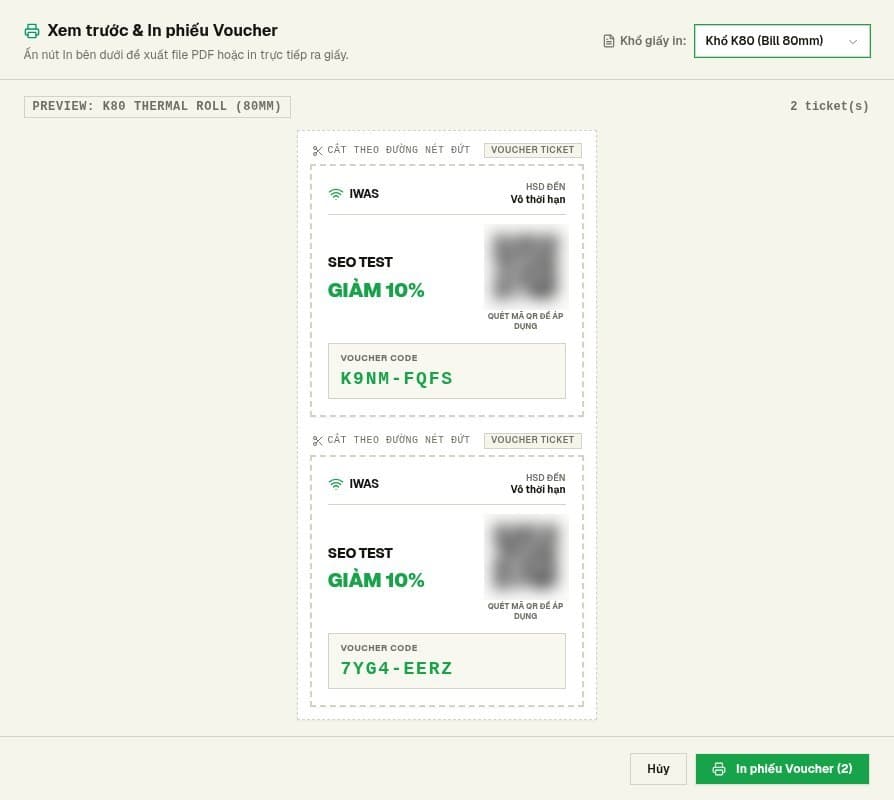
On IWAS, vouchers live in the Vouchers section. You can create them one by one or in bulk, then print tickets on A4, A5, or straight onto K80 thermal paper like a receipt. You can also export the list to CSV if you want to archive it or share it across branches.
Under the hood, a voucher is a discount code for a WiFi plan — percent off or a fixed amount. For a fully free gift, set the discount to 100%. Each voucher is valid by date range: you choose from which day to which day the code still works. Guests use the voucher when buying a plan on the login page; after the purchase they receive an activation code that gets them online. Activation codes are issued by the system and you don't create or print them in advance, so a printed ticket is a discount ticket, not a WiFi pass.
When to use vouchers vs let guests pay with VietQR
Vouchers fit moments you want to give or promote on purpose: regulars, a drink combo with WiFi time, an event, or making up for a failed payment. VietQR fits when a guest is mid-task at the table and needs more time right now — they scan and finish without waiting for staff. The two run side by side; you do not have to pick only one. For the four everyday ways cafes use vouchers and how guest activation codes work, see cafe WiFi voucher codes.
If you run a chain with your own POS and want vouchers issued automatically via API, there is a separate guide on WiFi voucher API integration. For one or two locations, a pre-printed stack of vouchers is usually enough.
When a cafe does not need hotspot billing yet
Honestly, not every cafe needs it. If the place is usually quiet, mostly takeaway, or almost never has someone occupying a table all afternoon, free WiFi with a time limit is enough — or you may not need to change anything yet. Selling hourly WiFi at cafes has a section on when not to sell extensions; read that before you decide.
Hotspot billing is most worth it when tables stay full, many guests work for long stretches, and staff already burn time on WiFi chores.
How hotspot billing with IWAS runs on MikroTik
Router connection: RouterOS v7+, ZTP, no static IP
IWAS connects to the router through ZTP — the router receives configuration without you typing every command by hand. ZTP runs over WireGuard, so the cafe's MikroTik needs RouterOS v7 or newer. You do not need a static public IP, and you do not stand up your own RADIUS server; IWAS handles that in the cloud. Concrete steps are in Install Captive Portal + PayOS in 15 Minutes.
Package: time, speed, and data
A Package is the "plan" you give guests — you set time, speed, and data. To start, one free package and one paid package are enough; run that for a few days before adding more. Whether data is capped depends on how you configure the Package. Parameter details are in How to Limit WiFi Time on MikroTik for Cafes with IWAS.
VietQR payment through the cafe's own PayOS account
Each cafe configures its own PayOS account on IWAS, and guest payments go through that PayOS account. If PayOS is not configured yet, the portal will not show a QR code. Guests only see payment methods the cafe has enabled, plus manual confirmation when they pay at the counter. Any PayOS gateway fees follow PayOS's own policy.
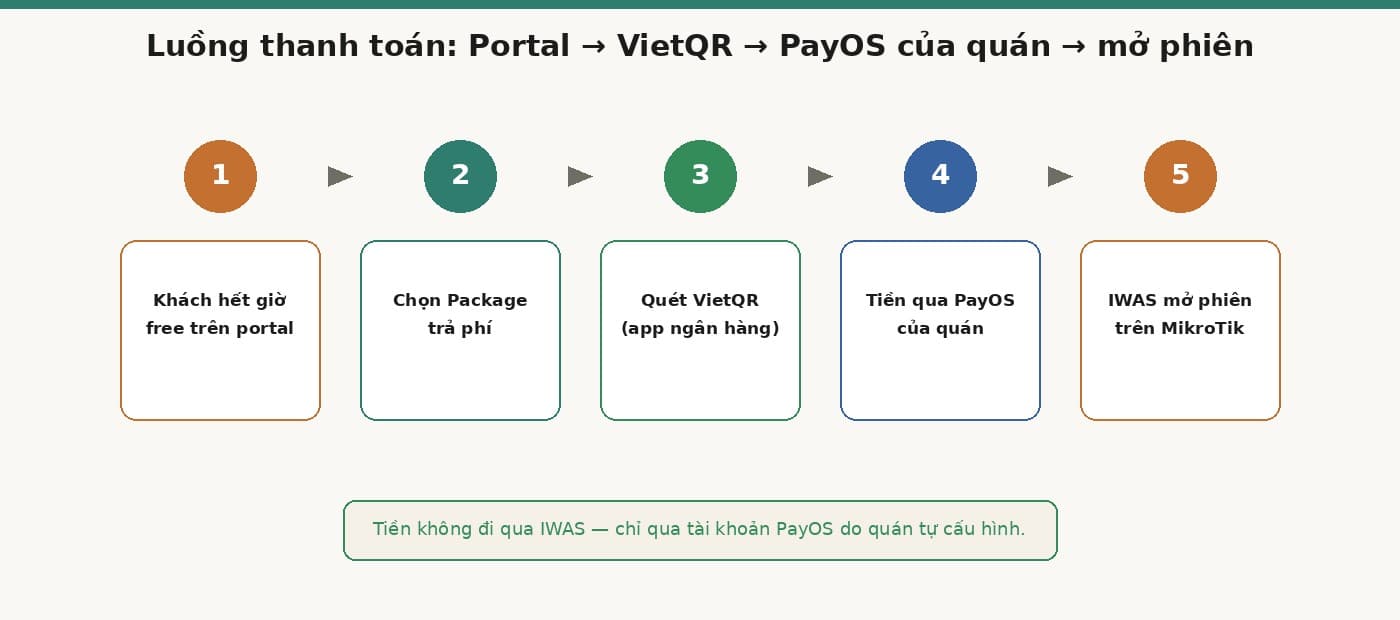
IWAS fees and guest WiFi prices are two different things
This mix-up comes up often, so let's be clear. The IWAS fee is what the cafe owner pays for the software: a 14-day trial, then 249,000 VND/month per location. Guest WiFi package prices are set by you, and that money goes through the cafe's PayOS.
If you are unsure how to price packages, Selling hourly WiFi at cafes has example price frames. One thing to remember: do not try to undercut 4G. Guests buy more time because they still have work at the table — not because your data is cheaper.
One-week checklist: from handwritten passwords to automatic billing
These steps cover billing only. If you're redoing the whole cafe WiFi setup, from the internet line to the router, see the owner's checklist from setup to daily operation.
- Confirm the cafe's MikroTik is on RouterOS v7 or newer.
- Separate guest WiFi from the internal network (POS, cameras, staff devices).
- If you want to sell more time, configure the cafe's PayOS account on IWAS.
- Create one free Package and one paid Package — no need for more yet.
- Pre-print a stack of vouchers for regulars and for making up payment glitches.
- Write a few plain lines on the portal: how long free lasts, and what to do when it ends.
- Test like a real guest: connect, sign in, wait for time to end, buy a small package.
- Watch the Payments page for 7 days — see whether guests buy more time and what staff still handle by hand.
FAQ
Does hotspot billing on MikroTik need a static IP?
No. IWAS connects to the router through ZTP over WireGuard, so the cafe does not need a static public IP. The MikroTik only needs RouterOS v7 or newer.
Do I have to install RADIUS or User Manager myself?
No. RADIUS runs in the cloud and IWAS operates it. You do not install RADIUS yourself or create users manually in User Manager anymore.
Can I still use vouchers with IWAS?
Yes. You can create vouchers one by one or in bulk, print on A4, A5, or K80, and export the list to CSV. A voucher is a percent or fixed-amount discount on a WiFi plan; for a free gift, set the discount to 100%. The code that gets a guest online is the activation code they receive after a successful purchase.
If PayOS is not configured yet, can guests still pay?
If PayOS is not configured, the portal will not show a QR code. The cafe can still offer limited free WiFi, issue vouchers, or use manual confirmation when guests pay at the counter.
Is the IWAS fee the price guests pay for WiFi?
No. The IWAS fee is what the cafe owner pays for the software: a 14-day trial, then 249,000 VND/month per location. Guest WiFi package prices are set by the owner — two separate amounts.
Wrap-up
Hotspot billing does not turn your cafe into a carrier. It simply cuts the small manual jobs around WiFi: handwriting passwords, creating codes, rotating a shared password, remembering who sat how long. Guests get their own session and clear time; anyone who needs to stay can buy more time themselves; vouchers remain for moments you want to treat regulars well.
If your cafe already has a MikroTik on RouterOS v7 or newer, you can try IWAS for 14 days on your own router. Want to see cost first? Check IWAS pricing — remember 249,000 VND/month/location is the owner's software fee, not the WiFi package price sold to guests. For the overview, start at getiwas.com.