You probably know the routine. The shop opens at 7, you log into the router, change the WiFi password, and tape a fresh note to the counter. Before the first batch of coffee is even ready, a regular asks, "What's today's password?" By 10, the new password is sitting in the group chat of the office across the street, and the guy who has been camping in the corner since yesterday is back on his laptop.
If you change the password every day to keep your WiFi under control, this post takes an honest look at what that habit actually fixes, where it falls short, and when it makes sense to move to a captive portal on your MikroTik router.
Why do cafes change the WiFi password in the first place?
Ask around and most owners are trying to solve one of three things:
- Guests who stay for hours without ordering more, holding a table while new customers can't find a seat at the busy hours.
- Freeloaders, whether that's the shop next door, the office opposite, or someone who saved the password last week.
- Slow WiFi at peak times, because a couple of heavy downloads drag everyone else down.
They sound similar, but each one needs a different fix. Changing the password is a single switch for the whole shop, while two of those three problems are really about individual guests.
Changing the password daily: what you gain, what you lose
What you gain
To be fair, it does have real upsides. You don't need new hardware or software, just a quick change on the router. And every change kicks out phones and laptops that saved the old password, which helps keep long-term freeloaders off your network.
What you lose
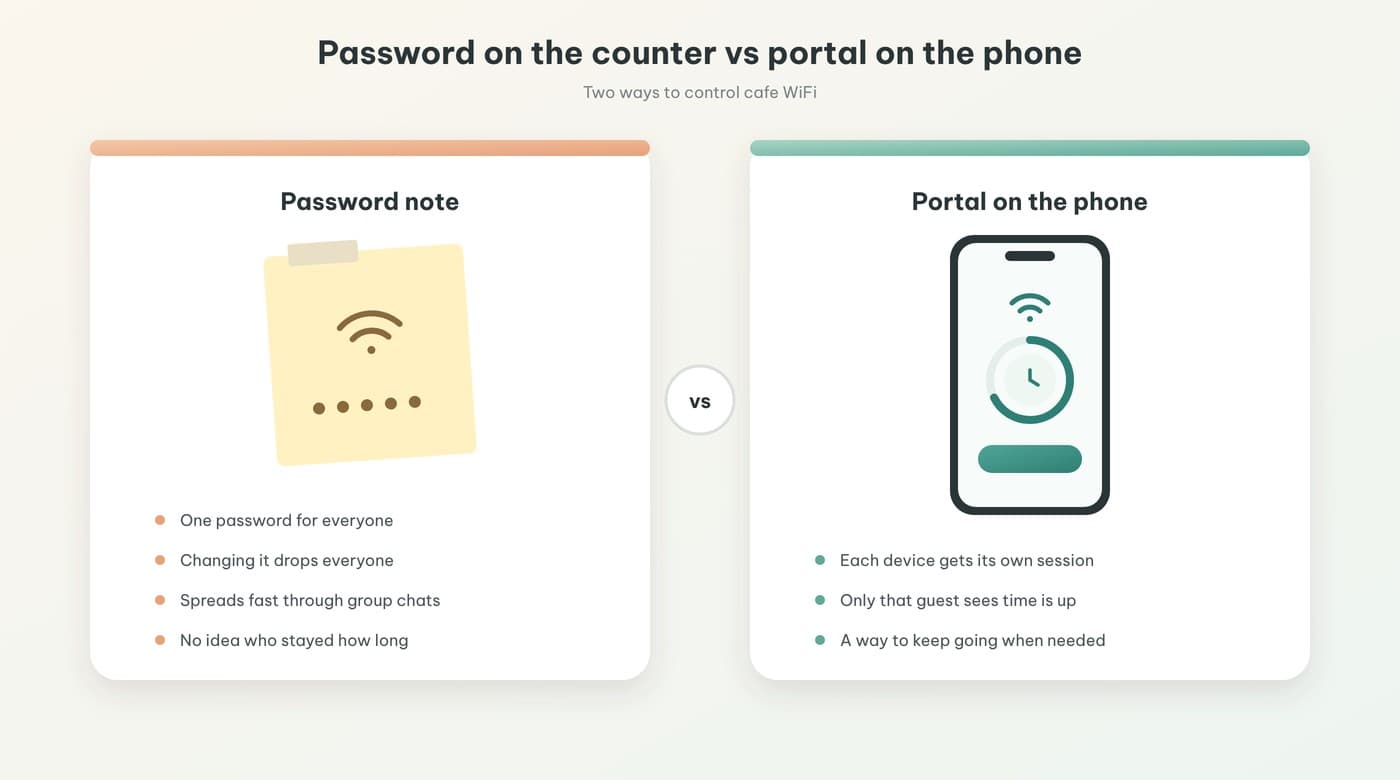
The catch is that passwords travel faster than you'd expect. Guests snap a photo of the note, drop it into a group chat, read it out to friends at the table, and within a few hours the new password isn't much of a secret anymore.
Every change also knocks the whole shop offline at once, including the person who just walked in and is still ordering. Your staff answer the same question over and over, reprint the note, and update the WiFi QR sticker if you have one.
Most importantly, a password tells you nothing about who has been online for how long. Someone who just arrived and someone who has been there since morning get exactly the same treatment. And for the guest who genuinely needs more time to finish their work, there's no proper way to keep going other than asking for the password again.
How a captive portal is different: sessions, not passwords
A captive portal is the sign-in page that pops up as soon as a guest joins your WiFi. Instead of one shared password for everyone, each device gets its own session: the clock starts when the guest signs in, and when time is up, the portal shows them what they can do next. If you want the technical side, how a captive portal works on MikroTik covers it well. Here we'll stick to what it means for running the shop.
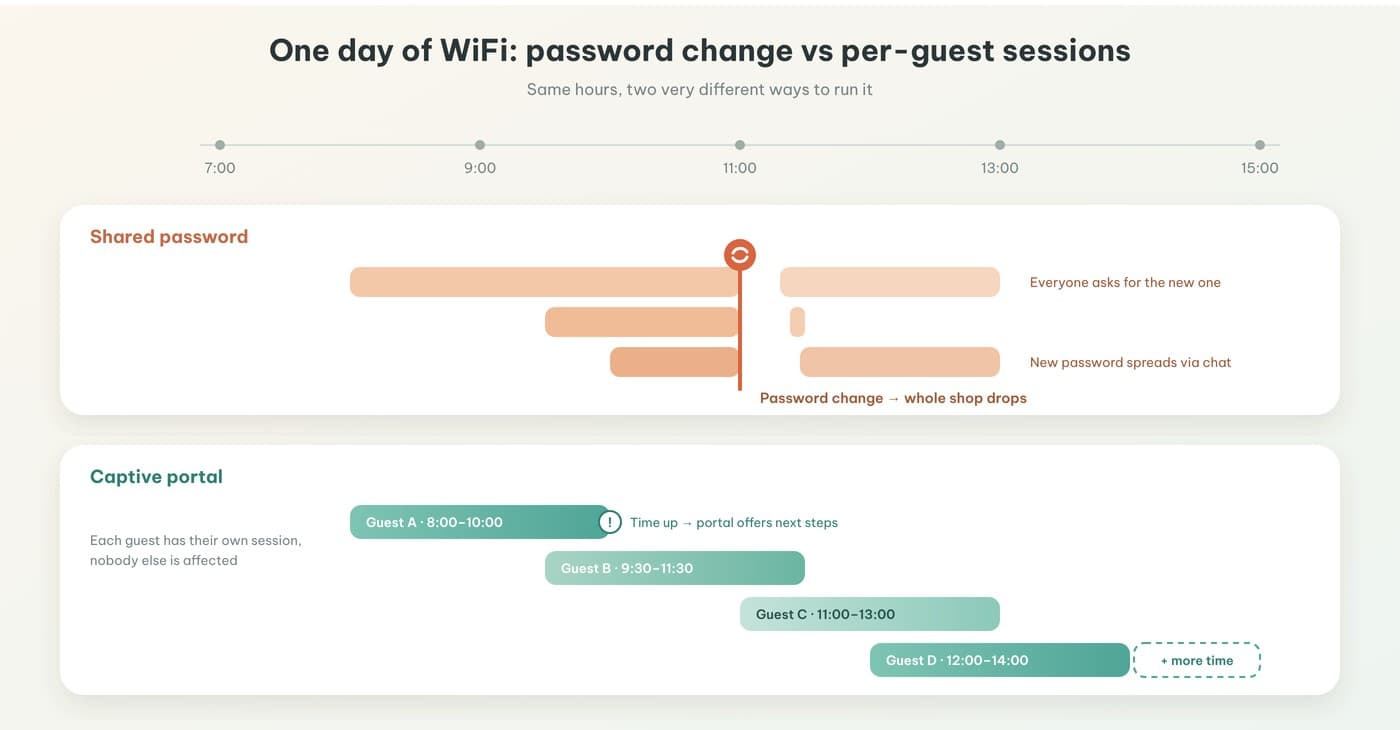
Picture an ordinary day and the difference is obvious. With a shared password, whenever you change it, everyone who is online drops at the same moment. With a portal, the guest who arrives at 8 gets an 8 o'clock session, the one who arrives at 9:30 gets their own, and when someone's time runs out, only that person sees the notice while everyone else keeps browsing.
Quick comparison against the three goals
| Goal | Changing the password | Captive portal + Package |
|---|---|---|
| Guests staying long without ordering | Cuts off the whole shop, including new arrivals | Limits each session, and when time is up the portal invites the guest to choose what's next |
| Freeloaders | Works for a while, until the new password spreads | Doesn't depend on a leaked password, every device goes through the portal |
| Slow WiFi at peak times | Barely helps | Set a speed for each Package so a few heavy users don't slow everyone down |
For long stays, a portal gives you a much gentler nudge than cutting off the whole room. A better way to handle the one-drink, all-day guest goes into this in detail.
For slow WiFi, you set a speed for each Package, as explained in how to limit WiFi time and speed on MikroTik. One small note: IWAS doesn't switch policies automatically by time of day yet. If you want different rules for the lunch rush and the quiet afternoon, you switch the Package by hand when peak hours start and end.
Want to try this on your own cafe WiFi? Try IWAS free for 14 days, then the Starter plan is 249,000 VND per month per location. IWAS works with MikroTik (RouterOS v7 or newer), OpenWrt and UniFi. Start your free trial
When a daily password change is good enough
Not every cafe needs a portal. If your place is small, guests rarely stay long, most orders are takeaway, and you'd rather not add a sign-in step, a shared password that you change now and then is perfectly fine.
Whichever way you go, there's one thing worth doing right away: keep guest WiFi separate from your own network, meaning the POS, cameras, and staff devices. That way, even if the guest password leaks, the important equipment stays on its own network.
Moving from password changes to a captive portal on MikroTik
If you already have a MikroTik router, the switch is simpler than most people expect. In short, it's five steps:
- Check that the router runs RouterOS v7 or newer.
- Add the router in IWAS.
- Let the router pick up its configuration through ZTP, so you don't type commands line by line.
- Turn on the portal and create one free Package, for example 60 minutes per sign-in.
- Test it like a real guest: connect, sign in, and wait for the time to run out to see what the portal shows.
ZTP runs over WireGuard, so you don't need a static public IP or your own RADIUS server. The full walkthrough is in install a captive portal on MikroTik in 15 minutes. For a wider look at the ways to charge for and control cafe WiFi, see hotspot billing on MikroTik for cafes.
What about your regulars, the ones who always got today's password first? You can print vouchers from IWAS and hand them out. A voucher is a discount code, either a percentage or a fixed amount, and if you want it to be free you set the discount to 100%. Create them one at a time or in bulk, print on A4, A5, or straight onto K80 thermal paper, the same rolls your POS uses, and set which days each one is valid.
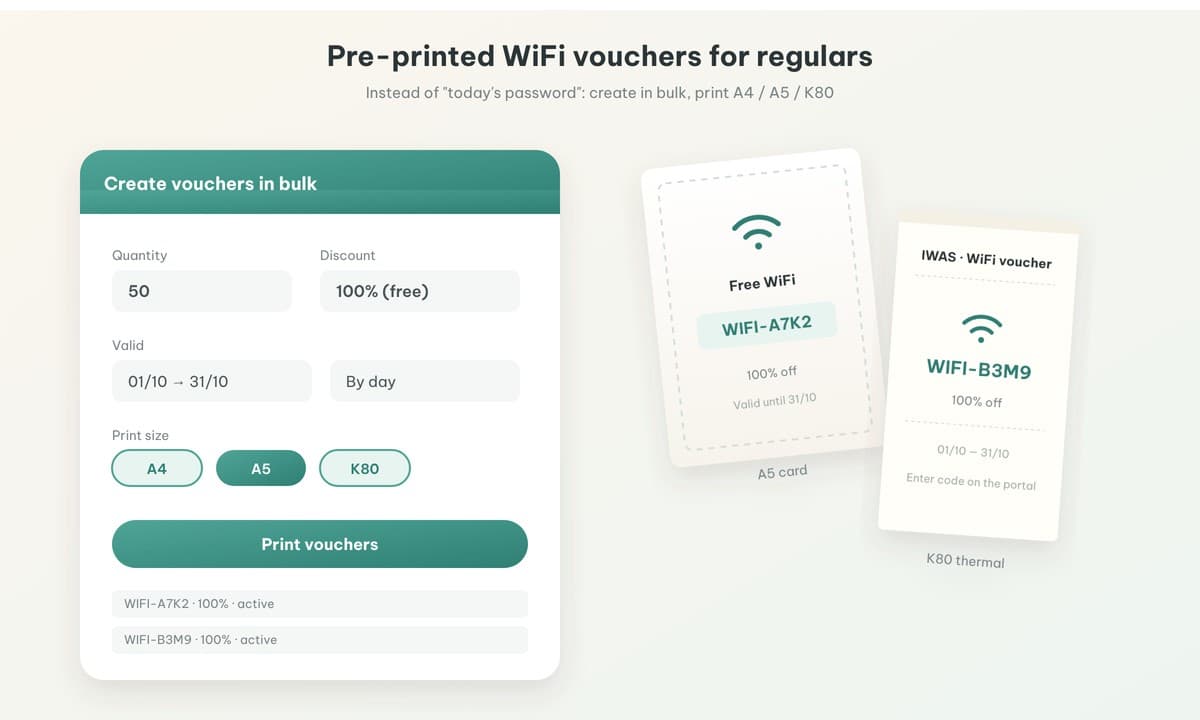
Optional: a "keep going" option for guests who need more time
You don't have to do this, but it's worth thinking about. When the free session ends, instead of just a "time's up" message, the portal can let guests buy more time and pay with VietQR right on their phone. The condition is that your cafe has set up its own PayOS account in IWAS. Without it, the portal won't show a QR code, and your free WiFi with limits and vouchers keeps working as usual.
People who buy extra time are usually halfway through something on their laptop and want to stay, not looking for WiFi that's cheaper than 4G, so there's no need to compete with mobile data on price. How selling hourly WiFi with a QR code works walks through the guest side, and selling hourly WiFi at cafes helps you decide whether it fits your shop.
Not sure how long the free session should be? How long should cafe guests get free WiFi has a few ideas to start from.
Sample signs for your counter
Once the "Today's password is…" note is gone, what goes on the counter instead? Here are a few short lines you can adapt to your shop's voice (60 minutes is just an example):
- "Free WiFi for 60 minutes each time you sign in. Need more time? Pick a package right on the screen."
- "Join our WiFi and the sign-in page pops up on its own. No password needed!"
- "Regular here? Ask for a WiFi voucher when you order."
Write it as an invitation to keep going rather than a warning, and guests will feel a lot more welcome.
IWAS is guest WiFi management software for cafes: guests get online through a login page (captive portal), the cafe sets its own plans by time, speed and data, and guests can buy more time with VietQR through the cafe's own PayOS account. IWAS works with MikroTik (RouterOS v7 or newer), OpenWrt and UniFi routers. Learn more about IWAS.
FAQ
Should a cafe change its WiFi password every day?
It depends on the shop. For a small cafe where guests rarely stay long, changing the password regularly is fine. If you're doing it to limit long stays, a captive portal works better because it limits each guest's session instead of cutting off the whole shop.
Does changing the password disconnect guests who are online?
Yes. When you change the password, every connected device drops off and has to enter the new one, including guests who just arrived. That's why changing it during a busy period tends to annoy the whole room.
Do guests need a password with a captive portal?
It depends on how you set it up. You can leave the WiFi open so the sign-in page appears as soon as guests connect, with no password to ask for. Usage time is tracked per device session.
If I use a captive portal, do I still need to change the password?
Not to control usage time, because the portal already limits each session. You should still keep your router admin password secure and keep guest WiFi separate from your internal network.
Does a captive portal on MikroTik need a static IP?
No. IWAS connects to the router through ZTP over WireGuard, so the cafe doesn't need a static public IP. The MikroTik only needs RouterOS v7 or newer.
Wrapping up
Changing the password every day is one switch for the whole shop, while the things that actually give you headaches, like long stays or a few devices hogging the connection, happen one guest at a time. A captive portal handles exactly that: one session per guest, clear time limits, new arrivals left undisturbed, and a way to keep going for anyone who needs more time.
If you have a MikroTik router running RouterOS v7 or newer, you can try a captive portal on your own router free for 14 days. After the trial, IWAS costs 249,000 VND per month per location. That's the owner's software fee, separate from whatever you charge guests for WiFi packages. Want to look around first? Start at getiwas.com.